


What does “pending” mean on a blockchain?
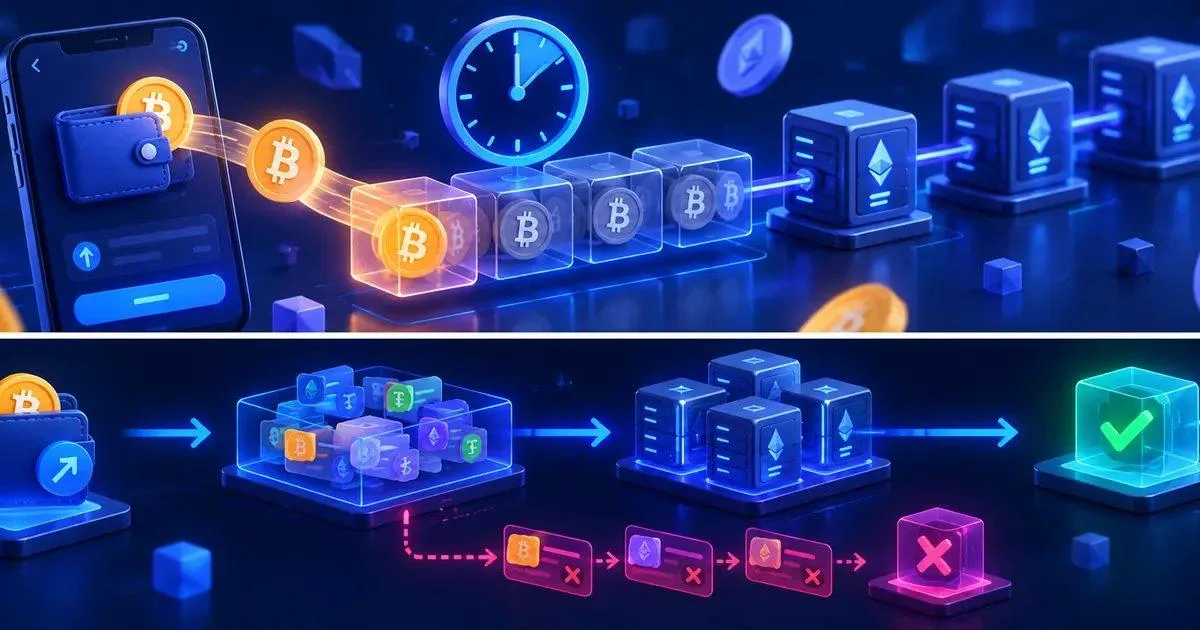
When you click “Send” in a wallet, the interface may make it seem like the process is instantaneous. Behind the scenes, however, several steps still need to take place. The wallet creates a transaction, signs it with the appropriate key, broadcasts it to network nodes, and waits for miners or validators to include it in a block.
A transaction is commonly described as “pending” while it awaits such inclusion or while the receiving service waits for additional confirmations. The exact terminology varies depending on the network. Some chains achieve finality quickly, while others use a confirmation model where security increases as more blocks are added after the transaction.
The “pending” status does not automatically imply that something is wrong. Often, it simply means that the network has received the transaction but has not yet processed it to the required level.
How a Cryptocurrency Transaction Moves from the Wallet to Confirmation
The lifecycle of a simple transaction can be broken down into five stages.
1. Transaction creation
Your wallet creates a transaction containing information such as the destination address, the amount, network fee parameters, and, depending on the blockchain, a nonce or other ordering data.
2. Signing
The wallet signs the transaction using the private key that controls the sender’s address. The private key must remain within the wallet or signing device. It must never be sent to an exchange, a swap service, or a support agent.
3. Transmission
The signed transaction is shared with the nodes on the blockchain network. In networks that use a mempool, valid unconfirmed transactions may remain pending until they are selected for inclusion in a block.
4. Inclusion in a Block
A miner or validator selects transactions based on network rules and current demand. Fee settings can influence priority on networks where users compete for limited space within blocks.
5. Confirmation or Finality
Once a transaction is included in a block, explorers may display it as successful or confirmed. However, a wallet, exchange, or swap provider may still wait for additional confirmations before considering the deposit final.
This distinction is important. A transaction may already be visible on the blockchain while the receiving service still shows the deposit as pending.
The most common reasons why a crypto transaction is pending

Inline image alt text: Cryptocurrency transaction confirmation flow showing pending transactions, validators, and a confirmed block
Network congestion
Blockchains have limited capacity. When many users send transactions at the same time, the queue can grow longer. Transactions with lower-priority fees may wait longer than those with fees that are more competitive under current conditions.
Congestion can change rapidly. A fee that seemed reasonable when the transaction was created might become less competitive just a few minutes later if demand increases.
Fee settings are too low
On networks with market-based fees, the amount or structure of the network fee can affect how quickly a transaction is included. Ethereum, for example, uses a base fee plus an optional priority fee. Other networks use different models, but the general idea is similar: block space is limited, and users can compete for it.
A low fee isn’t always a problem. If the transaction isn’t urgent, waiting may be cheaper than resubmitting it repeatedly. The key is to understand what your wallet has actually sent before taking action.
A previous transaction from the same wallet is still pending
Some account-based blockchains process transactions from a single address sequentially. If a previous transaction with a lower nonce is stuck, more recent transactions may remain pending behind it even if their fee settings seem reasonable.
This can make it seem as though the problem is the latest transaction, when the real bottleneck is an earlier transaction from the same wallet.
The transaction was created but not broadcast correctly
Sometimes a wallet’s interface may show a transaction attempt even if the transaction never reached the network. An internet connection interruption, a wallet error, or an RPC issue can interrupt the transmission.
That’s why the blockchain explorer is important. If the transaction hash isn’t found on the correct explorer after a reasonable amount of time, it’s possible that the transaction wasn’t successfully propagated.
The receiving platform is waiting for additional confirmations
Exchanges, bridges, and swap services may require a specific number of confirmations before crediting a deposit. The transaction may have already been successfully processed on the blockchain, while the service still shows it as pending.
The required number may vary depending on the asset and the network. Do not assume that a single confirmation is sufficient for every service.
The network or service is experiencing a temporary issue
RPC providers for wallets, exchanges, nodes, and explorers may also experience delays. An explorer might temporarily lag behind the chain, or a service might take longer to detect and process a deposit.
When a transaction appears to have been successful on a reliable explorer but the receiving service hasn’t updated, the problem may lie outside the blockchain itself.
How to diagnose a stuck crypto transaction
Use a structured process instead of repeatedly clicking buttons.
Step 1: Find the transaction hash
Copy the TXID from your wallet or the sending service. A transaction hash identifies the specific transaction on the blockchain. If you need a refresher, SimpleSwap explains what a transaction hash is and how to use it.
Step 2: Open the correct explorer
Use an explorer specific to the network you’ve selected. Transactions on Ethereum must be checked on an Ethereum-compatible explorer. Tron, Solana, Bitcoin, and other networks use their own explorers and formats.
Step 3: Check the status
Look for a status such as “pending,” “successful,” “failed,” or “abandoned.” Also check the sender, recipient, amount, fee, timestamp, and block information.
Step 4: Check if a previous transaction is blocking it
If your wallet uses ordered nonces, check the recent outgoing transactions from the same address. You may need to process or replace a transaction with a lower nonce first.
Step 5: Compare the blockchain status with that of the receiving service
If the explorer shows “successfully completed” but the receiving service shows “pending,” check that service’s confirmation requirements. If enough time has passed, contact support and provide the TXID, network, asset, and exchange or order ID.
Never send a seed phrase or private key to support. Legitimate troubleshooting can be performed using public transaction information and service-specific identifiers.
Is it possible to speed up or cancel a pending transaction?
Sometimes, but not on all networks or in all wallets.
On some account-based networks, a wallet may offer a “fast-track” feature. This usually involves sending a replacement transaction with the same nonce and a more competitive fee. Some wallets also offer a cancellation feature, which can send a replacement transaction that returns the funds to the same address or otherwise consumes the nonce.
These features only work as long as the original transaction is still replaceable. Once confirmed, a transaction cannot simply be reversed.
If your wallet does not support replacement, do not improvise by manually modifying the transaction’s advanced parameters unless you are very familiar with the network. Sending a second payment may result in a duplicate transfer instead of correcting the first one.
Pending, Failed, or Abandoned Transactions
These statuses can easily be confused.
Pending
The network is aware of the transaction, but it has not yet reached the required number of confirmations or finality.
Failed
The transaction was submitted, but its execution was unsuccessful. In smart contract networks, a failed transaction may still result in the payment of a network fee, since validators performed work to process it.
Deleted
A transaction remaining in a node’s pending transaction pool may eventually disappear if it is no longer propagated, if it has been replaced, or if the node’s local policies remove it. Different explorers may describe this situation differently.
Successful but Not Credited
This is an issue related to service processing rather than a blockchain error. The transaction is already on the blockchain, but the receiving platform may still be waiting for confirmations, deposit indexing, or transaction review.
How to Reduce Delays Before Sending Cryptocurrencies
A few checks can prevent most avoidable problems.
-
Verify the correct network before sending.
-
Check the fee estimate provided by your wallet.
-
Avoid manually setting very low fees unless you understand the consequences.
-
Check to see if the network is unusually congested.
-
Carefully verify the destination address.
-
Send a small test transaction to an address you’re not familiar with.
-
Make sure you have enough of the network’s native currency to cover the transaction fees.
-
Save the transaction hash after sending it.
-
Don’t resend the same payment just because the interface is slow.
If you’re performing a swap rather than a simple transfer, also keep in mind that confirmation time can affect the exchange window. SimpleSwap’s guide to fixed and variable cryptocurrency exchange rates explains why timing can be important during a swap.
How This Relates to SimpleSwap
A cryptocurrency swap involves both a blockchain layer and a service layer. You may need to send a deposit to an exchange address, wait for the network to confirm it, and then wait for the swap process to complete.
If a swap on SimpleSwap seems delayed, start by checking the transaction hash and the swap status. Check whether the deposit is visible on the blockchain, whether it arrived at the correct address, and whether the selected network matches the asset. If the deposit is confirmed but the swap hasn’t proceeded, contact SimpleSwap support via the official FAQs and support channels, providing the swap ID and transaction hash.
For destinations you’re not familiar with, it’s also helpful to follow a basic checklist for cryptocurrency transfer security before sending funds.
Frequently Asked Questions
How long can a cryptocurrency transaction remain pending?
There is no universal time limit. It depends on the network, current congestion, fee settings, and node policies. Some transactions are confirmed in a matter of seconds, while others may take much longer during periods of high demand or when the fee isn’t competitive.
Does “pending” mean my cryptocurrencies are lost?
No. “Pending” usually means the transaction hasn’t been finalized yet. Check the transaction hash before assuming the funds are lost.
Can I resend the transaction?
Don’t resend it blindly. A second transfer could result in a duplicate payment. First, check the status of the original transaction and see if your wallet supports replacing or canceling it.
Why is the transaction confirmed but the exchange still shows it as “pending”?
The exchange may require additional confirmations or may still be processing the deposit. Compare the status on the blockchain explorer with the service’s requirements, and if necessary, contact official support.
Can customer support cancel a transaction on the blockchain?
Usually not. Once a transaction has been confirmed, a third-party service cannot reverse the transaction on the blockchain itself. Options for reversing pending transactions depend on the network and the wallet.