


Crypto Wallets You’ll Actually Use Every Day

Updated: Apr 28, 2026


Nobody picks a crypto wallet because of a feature list. You pick the one that doesn’t annoy you. There are 300+ crypto wallets out there, and most of them sound the same on paper. What actually makes one stick? We think it comes down to four things: how simple it is, how many chains it covers, what else it lets you do (staking, DeFi, payments), and whether you can trust it with real money.
At SimpleSwap, we power the swap engine inside many of these wallets. We’ve processed millions of exchanges across 2,800+ assets, and along the way, we’ve learned which wallets people actually stick with. Not the ones with the loudest launch. The ones with the quietest daily use. Here’s what we found.

This is not a “best crypto wallet” ranking: we can’t tell you what the best crypto wallet is because the answer depends on what you do with your coins. It’s not a Trezor vs Ledger cage match, either; it’s not that kind of article. Instead, we’ve built a practical list of crypto wallets grouped by real-world usage patterns. Think of it as a field guide to the types of crypto wallets that actually matter in 2026.
Top Crypto Wallets by Use Case
Our list of popular crypto wallets is grouped by how people actually use them, not by marketing category. If you’re searching for the top crypto wallets or even a top 10 crypto wallets list, you’ll find that rankings mean nothing without context. Find the scenario that matches your day, and start there.

1. “I Just Got Here” — Exodus, Tangem
Your first crypto wallet shouldn’t feel like a cockpit. If you bought crypto on an exchange and want to move it somewhere you actually control, you need two things: a clear interface and zero room for catastrophic mistakes.
Exodus nails this on desktop and mobile. It supports 260+ cryptocurrencies and is often considered the “gateway” crypto wallet due to its clean layout. Beyond just holding, it’s a great entry point for staking assets like Solana, Cardano, and Cosmos, allowing beginners to earn rewards with one click directly in the app.
Tangem takes a different route. It’s a physical card — tap it to your phone, and you’re in. While the classic Tangem experience required no seed phrase, the Tangem 2.0 cards now give users the option to generate one if they prefer. It’s the gold standard for those who want hardware security without the “USB stick” feel. For newcomers exploring types of crypto wallets for the first time, Tangem blurs the line between a cold wallet and a hot wallet, and that’s exactly the point.
How to set up a crypto wallet: Tangem step-by-step
Tangem is one of the fastest crypto wallets to set up because the private key is generated inside the card’s secure chip. Seed phrases are optional on Tangem Wallet 2.0. If you’ve ever Googled “how to set up a crypto wallet” and felt overwhelmed, Tangem is the antidote.
- Download from the official site
Open tangem.com in your browser and click “Download.” Search for “Tangem” in the App Store or Google Play. The publisher is Tangem AG — double-check this to avoid fakes.

- Open the app and tap “Scan card.”
The welcome screen shows a short animation of how to hold the card. On Android, place the card flat against the centre of the phone’s back. On an iPhone, hold it near the top edge of the back. Keep it still until the app beeps.

- Create the wallet.
The app detects a blank card and offers to create a wallet. On Tangem 2.0 cards, you can choose between the classic chip-only mode (no seed phrase) and seed-phrase mode (a 12- or 24-word phrase is generated and shown on screen for you to write down). Pick one and tap “Create wallet.”

- Scan the backup cards.
Tangem ships in sets of two or three cards. Tap each backup card to the phone in turn when the app asks — each one becomes a full, independent copy of the wallet. Store the backups in separate physical locations. - Set an Access Code.
This is a PIN that protects the cards if someone else finds them. Write it down separately from the cards. Without the Access Code the cards are useless to a thief. - You’re done!
The main screen now shows your balances. You can receive, send, buy, or swap crypto straight from here.
How to swap crypto inside Tangem
Tangem Express is the in-app swap feature. SimpleSwap is one of the providers powering it, alongside other aggregators. Your private key never leaves the card — a hallmark of the most secure crypto wallets on the market.
- Open the token.
From the main screen, tap the asset you want to exchange. - Tap “Actions” → “Exchange.”
On some app versions the shortcut is a circular “Swap” icon right on the token card. - Choose what to receive.
Pick the target token, enter the amount in the source asset, and review the rate, network fees, and the provider name shown at the bottom of the quote. - Confirm the transaction.
Tap “Exchange” and place the Tangem card in the phone when prompted by the app. The card signs the transaction locally. - Wait for settlement.
The app shows a progress indicator while the blockchain confirms. Once it’s done, the new asset appears in your crypto wallet. No redirects, no account, no email.
How to set up Exodus: desktop and mobile
Exodus behaves slightly differently on desktop and mobile. On desktop, you download an installer; on mobile, you install a single app. Both end with the same 12-word backup. If Tangem shows how to set up a hardware crypto wallet, Exodus is the textbook example of a software wallet.
- Download from the official site.
Open exodus.com in your browser and click “Download.” The site auto-detects your OS. Always verify the URL before installing — phishing clones are common. On mobile, search for “Exodus: Crypto Bitcoin Wallet” in the App Store or Google Play. - Install and launch.
Exodus automatically creates an empty wallet on first launch — there is no “Create wallet” screen to click through. - Back up the wallet.
Go to Settings → Backup (gear icon on desktop; menu → Backup on mobile). Exodus shows a 12-word Secret Recovery Phrase. Write all 12 words on paper, in order. Never take a screenshot, and never paste them into cloud notes or a password manager.
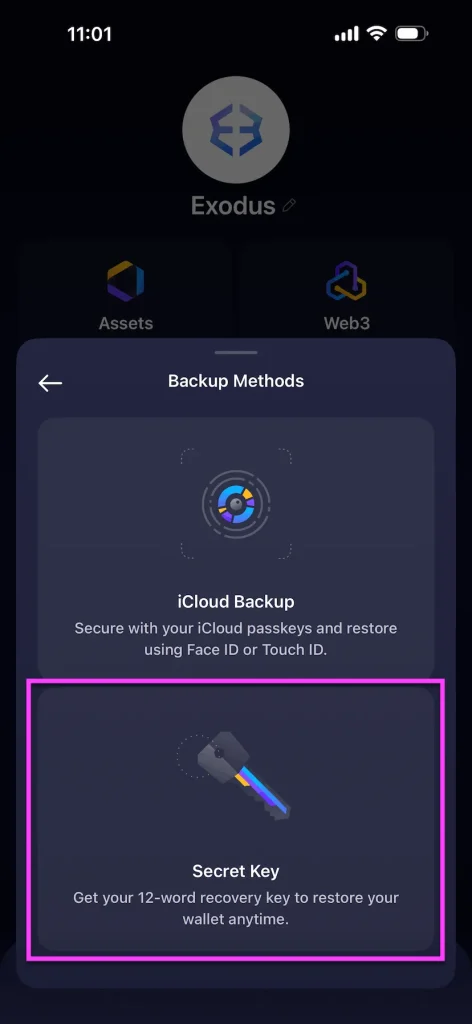
- Verify the phrase. Exodus asks you to retype several of the words in order to confirm you’ve written them down correctly. Don’t skip this — it’s the only way to know your backup actually works.
- Set a password. This password protects the wallet on this device. It does not replace the recovery phrase — if you lose the phrase and forget the password, the funds are gone.
- Test with a small transaction. Before moving any real amount, send a small test from an exchange to your new Exodus address and confirm it arrives.
To swap inside Exodus, open the “Exchange” tab on desktop or the “Swap” tab on mobile, pick your pair, enter the amount, and confirm. SimpleSwap powers these swaps behind the scenes, so there’s no account creation and no redirects, just a signed transaction from your own crypto wallet.

2. “I Live on One Chain” — Tonkeeper, MEW
Some people don’t need 2,800 tokens. They need the best experience on one network. Not every crypto wallet needs to be a Swiss Army knife — sometimes a scalpel is the right tool.
Tonkeeper is the go-to crypto wallet for the TON ecosystem. If your daily crypto life revolves around Telegram mini apps, TON staking, and Getgems, you probably already have it installed. It does one chain and does it really well.
MEW does the same for Ethereum. It’s where you go when you need to manage ERC-20 tokens, work with ENS domains, or interact with DeFi contracts directly. Not the prettiest wallet on this list, but if you think in gas fees, MEW speaks your language. Among Ethereum-specific crypto wallets, MEW remains one of the most trusted names, a reminder that longevity still counts in this space.

3. “I Need Everything in One Place” — Zelcore, SafePal, Cake Wallet
10 chains. 50 tokens. One app. This is the multi-chain reality for anyone past their first year in crypto. If you’ve outgrown single-chain solutions and need a crypto wallet that covers dozens of networks, this is your tier.
Zelcore supports 450+ coins and 50,000+ tokens across 60+ protocols. It is a powerhouse for those who value privacy and decentralization, offering a single dashboard for everything from asset tracking to mining rewards. In a crowded crypto wallets list, Zelcore stands out by actually delivering on the “all-in-one” promise.
SafePal bridges software and hardware. Its app supports 200+ blockchains and over 10,000 tokens. It’s a DeFi-heavy crypto wallet with a built-in DApp browser and cross-chain swap features, using a 100% air-gapped security model for its hardware devices.
Cake Wallet started with a Monero focus but has evolved into a sleek multi-asset tool supporting BTC, LTC, and ETH. While it’s the go-to for privacy-conscious users, it’s now a top-tier choice for mobile users who want an open-source experience without the clutter of “super-apps.” Among popular crypto wallets focused on privacy, Cake Wallet has earned its reputation by keeping the interface clean while expanding asset support.

4. “Security First” — Ledger, Trezor, Ellipal, CoolWallet, OneKey
You’re here to make sure no one else touches your crypto. Ever. But “Cold” doesn’t have to mean “Inconvenient.” This category is home to the most secure crypto wallets available: the ones designed to keep your keys offline and out of reach. If you’re shopping for cold wallets for crypto, these are the heavyweights.
Ledger paired with Ledger Live gives you access to 15,000+ assets. You can stake, manage NFTs, and swap, while your keys stay protected by a CC EAL6+ certified chip.In practically every “best cold wallet for crypto” discussion, Ledger occupies the top slot and for good reason.
Trezor is the OG. With the launch of Trezor Safe 5, they’ve introduced a color touchscreen and a Secure Element (CC EAL6+), combining their famous open-source firmware with modern hardware protection. The Trezor vs Ledger debate is the longest-running rivalry in crypto security, but this isn’t that kind of article — both belong in any serious crypto wallets list.
Ellipal goes fully air-gapped: no USB, no Bluetooth. It uses QR codes for all transactions, making it virtually immune to remote attacks. If your priority is the most secure crypto wallet setup money can buy, Ellipal’s total network isolation is hard to beat.
CoolWallet looks like a credit card and connects via encrypted Bluetooth, making it a hardware security solution that fits in a physical wallet. It’s a cold wallet that doesn’t look or feel like one, which is exactly why it appeals to people who carry crypto the way they carry cash.
OneKey is the rising star for those who love open-source tech but need multi-chain flexibility. It supports desktop, mobile, and browser extensions with a heavy emphasis on user privacy. For users exploring the types of crypto wallets beyond the Big Two (Ledger and Trezor), OneKey is a breath of fresh air.
5. What Ties All of These Together
Different wallets, different users, different daily routines. But one thing shows up in every scenario: at some point, you need to swap.
And the swap should be invisible: you shouldn’t need to create a new account, get redirected to another site, or send funds somewhere and hope they come back. You tap a button in your crypto wallet, pick two assets, and confirm — done.
That’s what SimpleSwap was built for. Since 2018, we’ve been the swap layer inside crypto wallets like Exodus, Tangem, and others — 2,800+ assets, fixed and floating rates, self-custodial. While we don’t build wallets ourselves, we are a self-custodial service that ensures the swap functionality within your favorite app works flawlessly every time and across any chain. The best infrastructure is the kind you never notice, and we’re perfectly fine with that.
How to Choose a Crypto Wallet
With so many options on the market, choosing the right crypto wallet can feel like picking a phone plan — too many tiers, too much fine print. Here’s a simple framework. First, decide whether you need a hot wallet, a cold wallet, or both. Hot crypto wallets are best for daily transactions and quick swaps. Cold crypto wallets for crypto are built for long-term storage where security outweighs convenience. Most experienced users end up with one of each.
Second, think about chains. A single-chain crypto wallet like Tonkeeper is perfect if you live on TON. A multi-chain crypto wallet like Zelcore or SafePal makes sense if your portfolio spans dozens of networks. Third, consider what you actually do inside the wallet — staking, swapping, DeFi, NFTs. The best crypto wallet for you is the one that handles your daily workflow without forcing you into external apps.
Finally, check the trust signals: open-source code, public audits, a track record without major exploits, and active community support. The top crypto wallets in any category share these traits. No single crypto wallet is perfect for everyone — that’s exactly why we’ve organized this guide by use case rather than ranking.
FAQ: Crypto Wallets
What is a crypto wallet?
How do crypto wallets work?
How to set up a crypto wallet?
Which crypto wallet is the most secure?
What is the best cold wallet for crypto?
The information in this article is not a piece of financial advice or any other advice of any kind. The reader should be aware of the risks involved in trading cryptocurrencies and make their own informed decisions. SimpleSwap is not responsible for any losses incurred due to such risks. For details, please see our Terms of Service.